


Format and display content on HD44780 LCDs (1602 / 2004) with scrolling, automatic pagination, and fixed prefix/postfix labels — all without the RPLCD dependency.
- Frame-based API — group rows into a
Frame; the library handles page breaks automatically - Horizontal scrolling — scroll in, scroll to blank, or scroll only when text overflows
- Prefix / postfix — keep static labels (e.g.
"Temp: "," °C") separate from the changing value - Zero RPLCD dependency — talks directly to the PCF8574 I2C expander via
smbus2 - Context-manager support —
with HD44780(...) as lcd:closes the I2C bus on exit - Backward-compatible — v1 method names (
scrollFrame,addWithGuid, …) still work
| Requirement | Version |
|---|---|
| Python | ≥ 3.7 |
| smbus2 | ≥ 0.4.1 |
| Hardware | HD44780 LCD (1602 or 2004) + PCF8574 I2C expander |
| OS | Linux with I2C enabled (e.g. Raspberry Pi OS) |
pip install lcd-content-formattersudo raspi-config # Interfacing Options → I2C → Enable
sudo reboot
i2cdetect -y 1 # confirm your display address (commonly 0x27 or 0x3F)from lcd_content_formatter import HD44780
with HD44780("PCF8574", 0x27, cols=20, rows=4) as lcd:
frame = lcd.Frame()
# Rows with static prefix and postfix
row_temp = frame.add("temp", "-", prefix="Temp: ", postfix=" °C")
row_hum = frame.add("hum", "-", prefix="Hum: ", postfix=" %")
row_time = frame.add("time", "-", prefix="Time: ")
row_date = frame.add("date", "-", prefix="Date: ")
import time
from datetime import date, datetime
while True:
row_temp.text = "23.5"
row_hum.text = "61"
row_time.text = datetime.now().strftime("%H:%M:%S")
row_date.text = str(date.today())
for row in (row_temp, row_hum, row_time, row_date):
frame.update_row(row)
lcd.scroll_frame(frame)
time.sleep(1)The following diagram illustrates how content is organised for a 20×4 display. The same model applies to 16×2 displays — only the physical dimensions change.
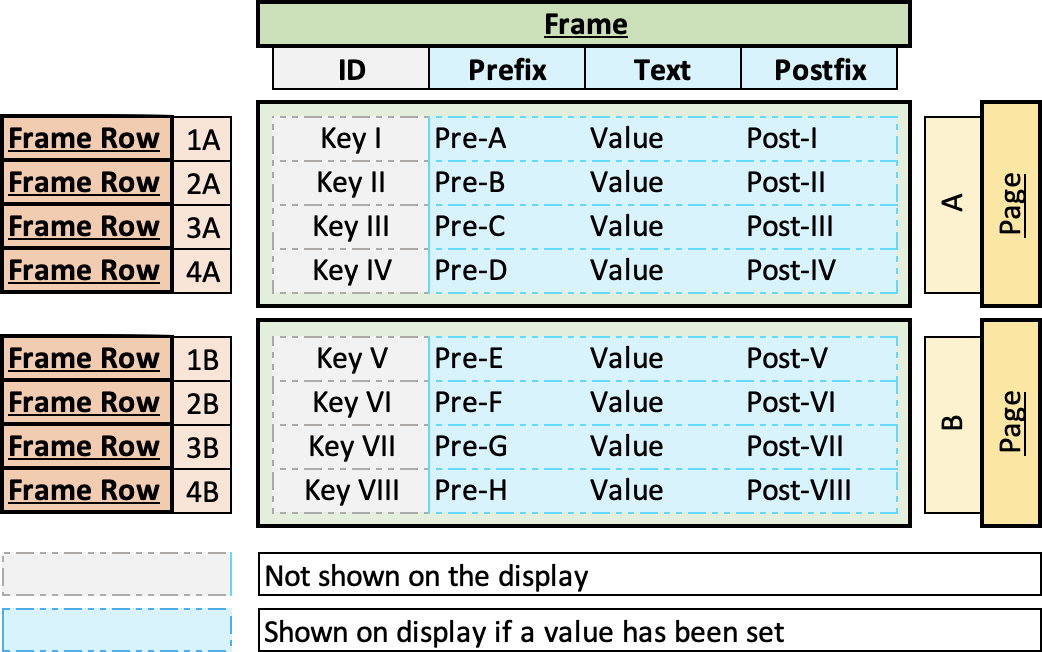
A Frame is a container that holds an ordered list of Frame Rows. When a Frame is passed to scroll_frame() or write_frame(), the library groups its rows into pages automatically — there is no manual page management.
When the number of Frame Rows exceeds the physical display height (e.g. 8 rows on a 4-row display), the library splits them into Pages. scroll_frame() iterates through every page in sequence.
Each Frame Row maps to one line on the display and has four parts:
| Part | Required | Description |
|---|---|---|
id |
optional | Unique key used to retrieve and update the row later. Omit with add_with_guid() for static rows. |
prefix |
optional | Static label before the value — e.g. "Temp: ". Never scrolls. |
text |
yes | The dynamic value you update at runtime — e.g. "23.5". This is the part that scrolls when it overflows. |
postfix |
optional | Static label after the value — e.g. " °C". Included in the scrolling window. |
The display renders each row as: prefix + text + postfix, padded or truncated to the column width.
┌────────────────────┐
│ Temp:  23.5 °C     │  row 0 — prefix="Temp:  "  text="23.5"  postfix=" °C"
│ Hum:   61 %        │  row 1 — prefix="Hum:   "  text="61"    postfix=" %"
│ Time:  14:32:01    │  row 2 — prefix="Time:  "  text="14:32:01"
│ Date:  2024-06-01  │  row 3 — prefix="Date:  "  text="2024-06-01"
└────────────────────┘
         Page 1 of 2

┌────────────────────┐
│ IP eth0: 192.168.. │  row 4 — long text scrolls left automatically
│ IP wlan0: UNKNOWN  │  row 5
│ CPU temp: 52.3 °C  │  row 6
│                    │  row 7 — empty row pads the last page
└────────────────────┘
         Page 2 of 2
Main class. Constructor parameters:
| Parameter | Type | Description |
|---|---|---|
i2c_expander |
str |
Expander type — "PCF8574" |
address |
int |
I2C address, e.g. 0x27 |
cols |
int |
Number of display columns (16 or 20) |
rows |
int |
Number of display rows (2 or 4) |
port |
int |
I2C bus number (default 1) |
backlight |
bool |
Backlight state at startup |
Create a new, empty Frame object (also importable as from lcd_content_formatter import Frame).
Add a row with an explicit string ID. Raises DuplicateFrameRowError if the ID already exists.
Add a row with an auto-generated UUID as the ID. Use this for static labels that are never updated by ID.
Retrieve a row by ID. Creates an empty row when create_if_missing=True (default).
Replace the stored row whose id matches row.id with the updated object.
Remove a row by ID. Raises FrameRowNotFoundError if not found.
Remove all rows from the frame.
Render a single page of frame to the display. No scrolling — use scroll_frame for animations.
lcd.scroll_frame(frame, scroll_in=False, scroll_to_blank=False, scroll_if_fit=False, delay=0.5, show_first_after_scroll=True)
Display frame with optional horizontal scrolling.
| Parameter | Default | Description |
|---|---|---|
scroll_in |
False |
Text enters from the right edge |
scroll_to_blank |
False |
Text scrolls fully off the left before the next page |
scroll_if_fit |
False |
Animate even rows that fit without scrolling |
delay |
0.5 |
Seconds between scroll steps (controls speed) |
show_first_after_scroll |
True |
Reset display to page 1 after all pages finish |
Scroll mode combinations:
scroll_in |
scroll_to_blank |
Effect |
|---|---|---|
False |
False |
Standard — scrolls left until end of text is visible, then pauses |
True |
False |
Text enters from the right, stops when fully visible |
False |
True |
Text scrolls left until completely off screen |
True |
True |
Text enters from the right and exits to the left |
Release the I2C bus. Called automatically when used as a context manager.
| Attribute | Type | Description |
|---|---|---|
id |
str |
Unique identifier |
text |
str |
Dynamic value (the part that changes) |
prefix |
str |
Static label shown before text |
postfix |
str |
Static label shown after text |
full_text |
str |
Read-only: prefix + text + postfix |
| Exception | Inherits | Raised when |
|---|---|---|
LCDError |
Exception |
Base class |
FrameRowNotFoundError |
LCDError, KeyError |
Row ID not found in frame |
DuplicateFrameRowError |
LCDError, ValueError |
Row ID already exists |
I2CError |
LCDError, OSError |
I2C bus communication failure |
v2 removes the RPLCD dependency. The main changes are:
| v1 | v2 |
|---|---|
pip install RPLCD |
pip install smbus2 (done automatically) |
from HD44780 import HD44780 |
from lcd_content_formatter import HD44780 |
lcd.Frame() |
unchanged |
frame.addWithGuid(...) |
frame.add_with_guid(...) (old name still works) |
frame.getFrame(id) |
frame.get_row(id) (old name still works) |
lcd.scrollFrame(...) |
lcd.scroll_frame(...) (old name still works) |
Constructor: HD44780(expander, addr, cols, rows) |
same, positional order unchanged |
All v1 method names are kept as deprecated aliases so existing scripts continue to run.
Connect the PCF8574 I2C expander to your Raspberry Pi as shown below:
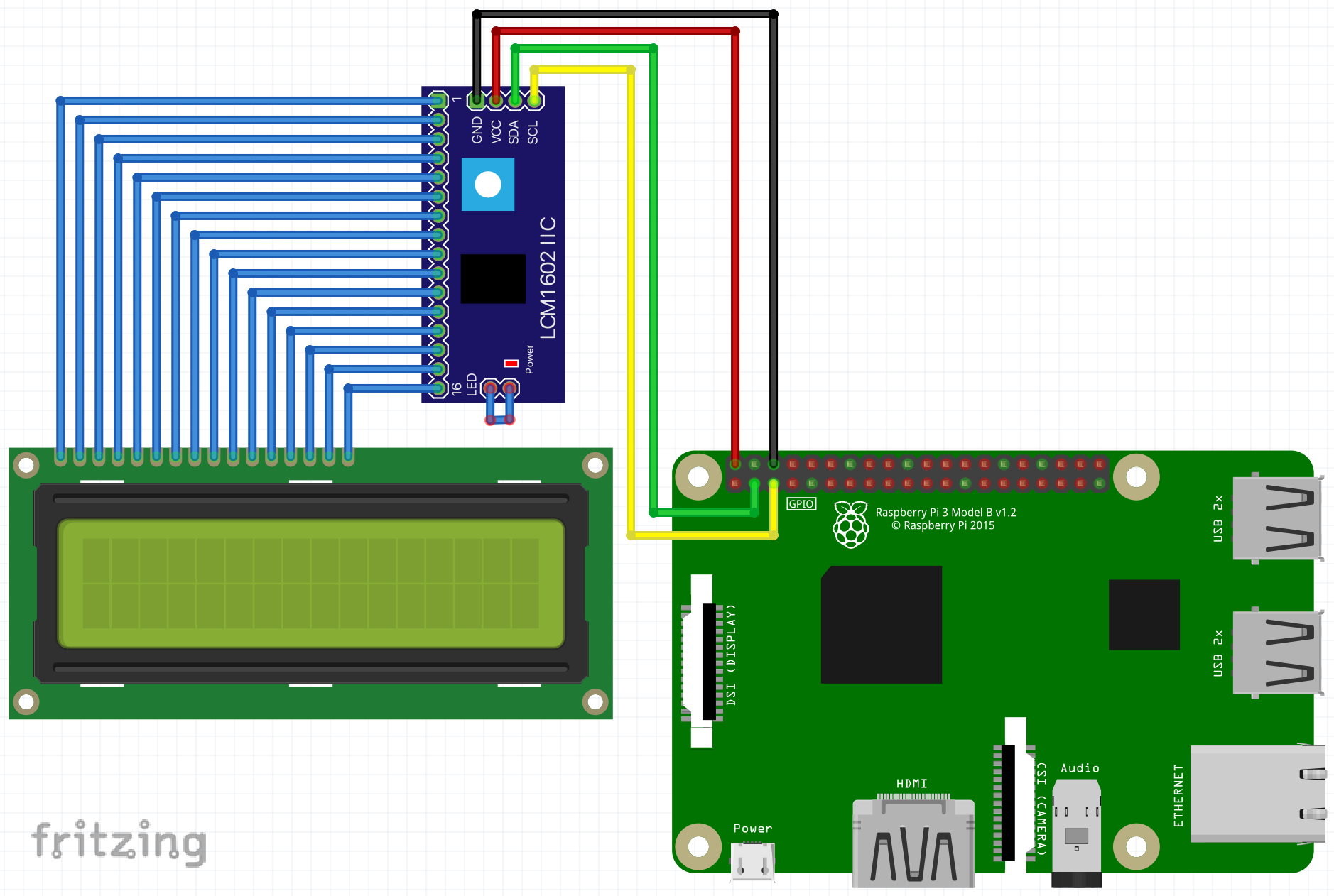
The default PCF8574 pin mapping assumed by this library:
| PCF8574 pin | HD44780 pin | Function |
|---|---|---|
| P0 | RS | Register Select |
| P1 | RW | Read/Write (always write) |
| P2 | EN | Enable |
| P3 | — | Backlight |
| P4–P7 | D4–D7 | 4-bit data bus |
A runnable demo is in the sample/ directory. It shows IP addresses, CPU temperature, a counter, date, time, and a long scrolling text across two pages on a 20×4 display.
Scroll animation examples:
- Standard scrolling text
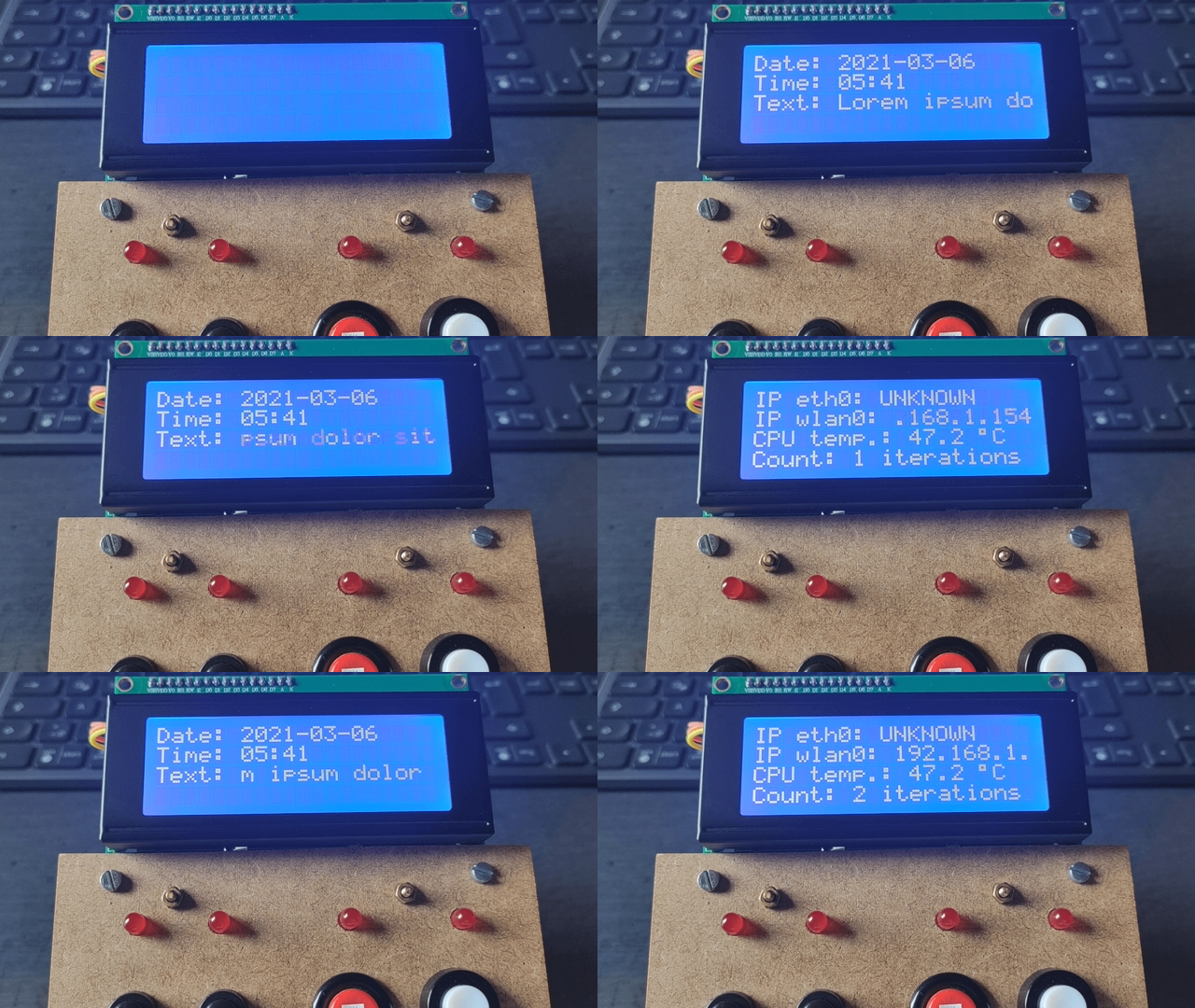
- Text scrolling in (
scroll_in=True)
- Text scrolling in and out (
scroll_in=True, scroll_to_blank=True)
Edit sample/config.py:
lcd_i2c_expander_type = "PCF8574"
lcd_i2c_address = 0x27   # use i2cdetect -y 1 to find your address
lcd_column_count = 20
lcd_row_count = 4python sample/sample.pyfrom lcd_content_formatter import HD44780
import config
import sample_functions
import time
from datetime import date, datetime
with HD44780(
config.lcd_i2c_expander_type,
config.lcd_i2c_address,
cols=config.lcd_column_count,
rows=config.lcd_row_count,
) as lcd:
frame = lcd.Frame()
# Rows with explicit IDs — updated in the loop by reference
row_ip_eth0 = frame.add("ip_eth0", "-", prefix="IP eth0: ")
row_ip_wlan0 = frame.add("ip_wlan0", "-", prefix="IP wlan0: ")
row_temp = frame.add("cpu_temp", "-", prefix="CPU temp: ", postfix=" °C")
row_counter = frame.add("counter", "-", prefix="Count: ", postfix=" iter.")
# These rows push the frame beyond 4 rows → page 2 is created automatically
row_date = frame.add_with_guid("-", prefix="Date: ")
row_time = frame.add_with_guid("-", prefix="Time: ")
row_long = frame.add_with_guid("Lorem ipsum dolor sit amet!", prefix="Text: ")
while True:
row_ip_eth0.text = sample_functions.get_ip_address("eth0")
row_ip_wlan0.text = sample_functions.get_ip_address("wlan0")
row_temp.text = str(sample_functions.get_cpu_temperature())
row_counter.text = str(config.sample_counter)
row_date.text = str(date.today())
row_time.text = datetime.now().strftime("%H:%M:%S")
for row in (row_ip_eth0, row_ip_wlan0, row_temp, row_counter, row_date, row_time):
frame.update_row(row)
# Change scroll_in / scroll_to_blank / scroll_if_fit to try different animations
lcd.scroll_frame(frame, scroll_in=False, scroll_to_blank=False)
config.sample_counter += 1See CHANGELOG.md.
MIT © 2021-2026 Phoeluga