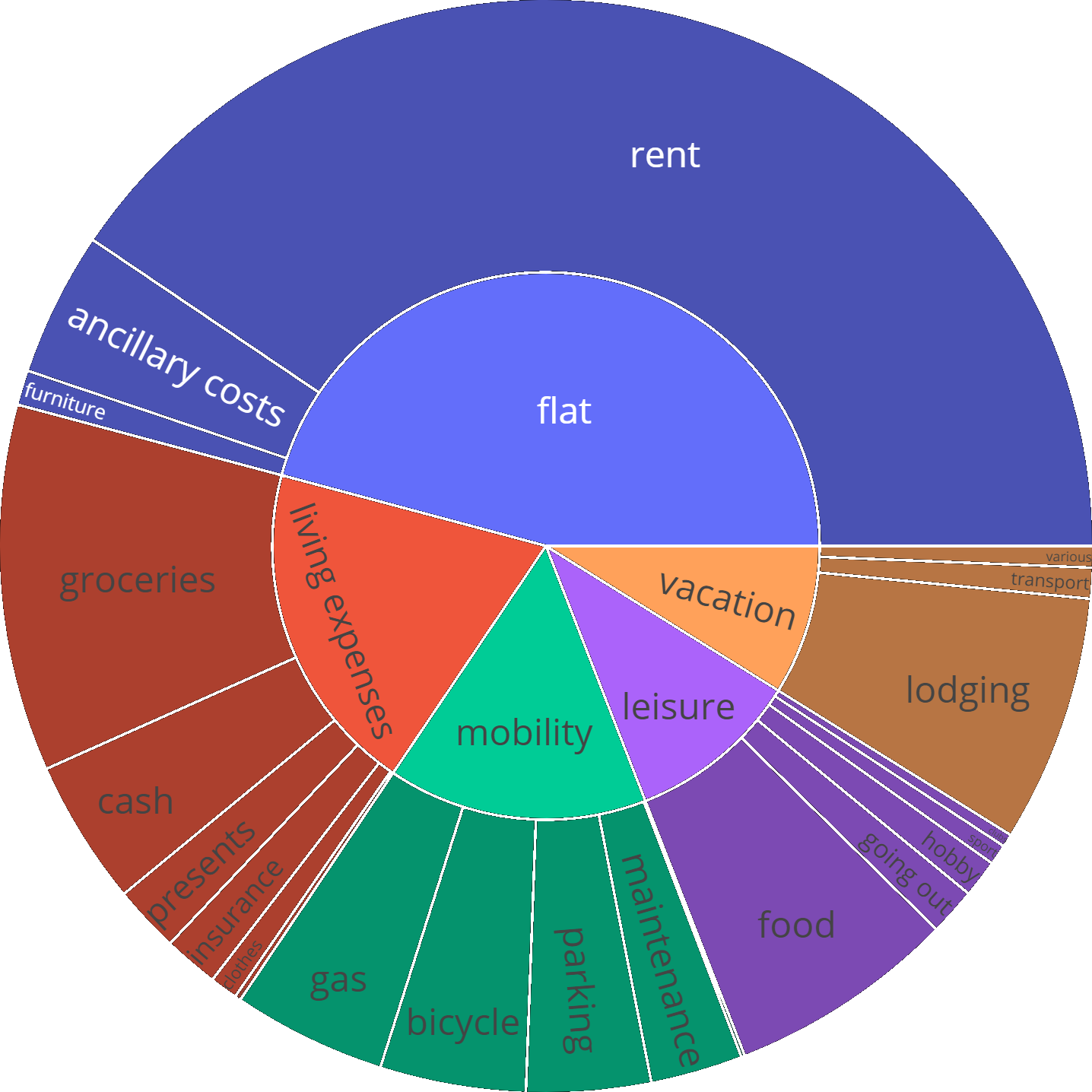
Banking transactions are saved into a csv database and then analyzed for a given timeframe.
Two scripts are used to manage the banking transactions:
transaction_importerdownloads new transactions using the comdirect bank API and appends them to the database. They are categorized based on their description text using Machine Learning.transaction_editoris a console user interface to modify transactions, which is faster to use than Excel.
The transactions are analyzed in a Jupyter notebook, see this example:
https://github.com/gerritnowald/budget_book/blob/main/src/analysis.ipynb
This is not a professional and easy to use budget planer and requires some programming knowledge and adaptation to cater to your individual needs.
Table of contents generated with markdown-toc
General settings such as file names & column names have to be set in config.ini.
Initially, transactions (e.g. from the last year) are exported from online banking as a csv file.
These form the database, stored locally on your hard drive.
The minimal required columns are
- date
- amount
- description
As an example for transactions, see
https://github.com/gerritnowald/budget_book/blob/main/src/transactions.csv
(only placeholder for description text)
The account balance over time has to calculated once using
calculate_balance FINAL_BALANCE
For Windows, the batch script start_calculate_balance.bat can be used (the final balance has to be set in the file).
The transactions have to be categorized for detailed analysis.
Two layers of categories can be used, separated with / (e.g. living expenses/groceries).
This has to be done manually in the beginning, e.g. using Excel.
Later, Machine Learning is used to automatically categorize new transactions.
Use categorizer_training.ipynb to train a machine learning model on your transactions with your categories, see also this blog post:
https://gerritnowald.wordpress.com/2025/12/16/revisiting-categorization-of-banking-transactions/
A list of all currently used categories is automatically saved as categories.csv.
My current model categorizer.joblib is also provided, but it will use my categories.
For the API import for the German comdirect bank, the user has to register and insert the credentials into config_comdirectAPI.json.
New transactions are merged to the database & categorized using two standalone scripts running in batch mode.
They can be used independently or in sequence, the latter by calling start_transaction_importer.bat.
New transactions are appended to the database using
transaction_importer
which is using the comdirect bank API.
New transactions are downloaded based on the last date in the database. Some overlap is considered and removed using a merge to make the import more robust.
Also the balance over time is updated.
Alternatively, they can also be read from an exported csv file.
A code example is provided in test_import_transactions.ipynb, which can be adapted in the interactive Jupyter environment.
The final code can then be inserted into the function def transactions_CSV() in transaction_importer.py.
The transactions are categorized based on their description text using Machine Learning, see also this blog post:
https://gerritnowald.wordpress.com/2023/04/05/categorize-banking-transactions-with-machine-learning/
Since the accuracy of the categoriziation is not perfect, wrong categories should be corrected.
For this, a console user interface is available, which can be run with
transaction_editor
see also this blog post:
https://gerritnowald.wordpress.com/2024/02/26/creating-a-command-line-interface-with-python/
It can also be used to split transactions, e.g. for cash withdrawal at the supermarket.
The console user interface is automatically run after transaction_importer.
The pre-selected line highlights the last previously appended transaction.
The spendings report can be updated by running analysis.ipynb.
Reports for different time frames can be generated by filtering the database.
It is recommended to export the notebook (e.g. as html or pdf) regularly (e.g. yearly) for later reference.
See also this blog post: https://gerritnowald.wordpress.com/2023/02/23/managing-spending-with-python-pandas/
Git can be used as backup.
If an online repo is used, it is strongly recommended to make it private and to exclude config_comdirectAPI.json.
- Pandas
- plotly (for sunburst diagram)
- sklearn (for ML categorization)
- curses (for console user interface)
On Windows, use install_dependencies.bat to install the required packages.
Contributions are welcome, especially regarding APIs for additional banks.
I started this personal project as the German comdirect bank abolished their online budget planer Finanzmanager. It aims to reproduce this functionality while being as simple and understandable as possible. In principle this project is applicable to every bank, which allows to export transactions as csv files. I decided to publish this project, since I thought that it might be useful to others.
thanks to Philipp Panhey for the comdirect API access:
https://github.com/phpanhey/comdirect_financialreport

