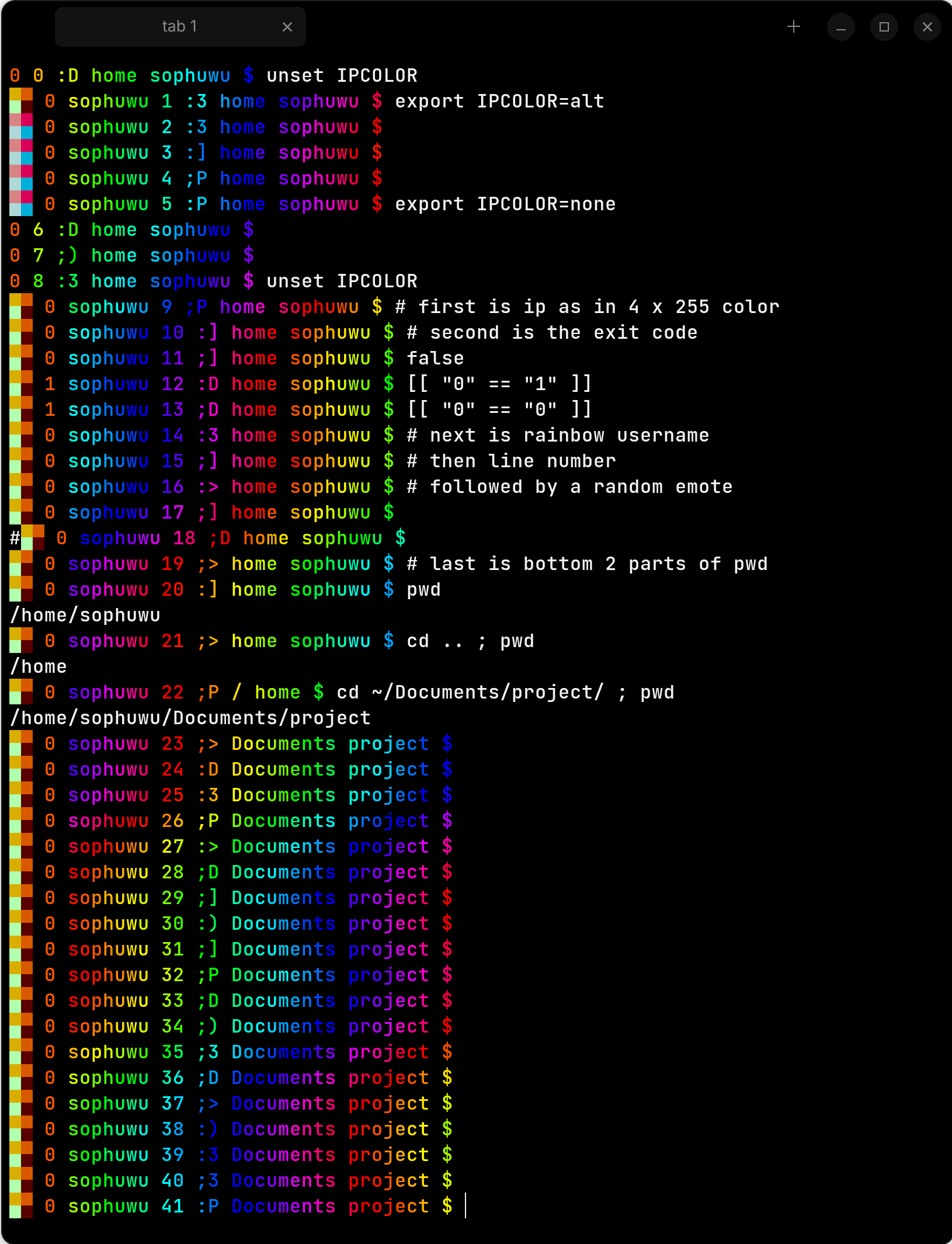
An extension for bash that generates a rainbow-colored PS1 with IP address shown as 4 blocks of color.
You can add the repository by running the following command:
sudo wget -O /usr/share/keyrings/soph-deb.gpg "https://cdn.sophuwu.com/deb/key.gpg" && echo 'deb [signed-by=/usr/share/keyrings/soph-deb.gpg] https://cdn.sophuwu.com/deb/ sophuwu main' | sudo tee /etc/apt/sources.list.d/sophdeb.listThis script will do the same thing:
curl https://cdn.sophuwu.com/deb/addrepo.sh | sudo shsudo apt update
sudo apt install bash-rb-ps1This will only work if you are using bash with xterm-like escape sequences. You can enable the generator by running:
eval $(bash-rb-ps1 help)If you experience an error, or want to disable the prompt, you can run:
unset PROMPT_COMMAND
PS1='${debian_chroot:+($debian_chroot)}\u@\h:\w\$ '
To see help and other information about the command, use:
man bash-rb-ps1.1make
sudo install ./build/bashprompt /usr/local/bin/bash-rb-ps1
sudo install ./releaser/bash-rb-ps1.1 /usr/local/share/man/man1/bash-rb-ps1.1Environment variables can be set to customize the prompt.
- Controls how the IP address is printed.
IPCOLOR=""IP address will be colored with the default color palette.IPCOLOR="alt"IP address will be colored with an alternate color palette.IPCOLOR="none"IP address will not be printed.
- Controls the length of the printed working directory.
PWDLEN=0Full path.PWDLEN=1Only the current directory.PWDLEN=2Current directory and its parent.
- Controls the format of the prompt.
- Only valid format specifiers will be printed. Strings or invalid specifiers will be ignored.
- Default:
"%i %? %u %l %e %d" - Certain specifiers allow custom colours, to use them, put a number 0-255 after the
%in the formfg.bg(%32.240u,%.42l,%128d). - Format specifiers:
%i- IP address (4 blocks of color)%?- Exit code of last command%u- Username%h- Hostname%l- Line number%e- Random emote (:D, :P, etc.)%d- Current working directory (shortened according toPWDLEN)