bioGen-EMS 2.0 is an advanced, open-source Electrical Muscle Stimulation (EMS) toolkit designed to enable researchers, developers, and enthusiasts to explore integrating EMS technology in various interactive applications. This project builds upon the foundation of the original bioGen-EMS toolkit, offering enhanced features, improved hardware compatibility, and refined control mechanisms for more precise and versatile muscle stimulation. This repository gives information about everything you need to build a programmable four-channel Electrical Muscle Stimulator (EMS), which we call bioGen-EMS. This setup is easy and requires off-the-shelf components.
- Overview
- Features
- Circuit Design
- Installation
- Usage
- Hardware Requirements
- Contributing
- License
- Contact
bioGen-EMS 2.0 is designed for use in Human-Computer Interaction (HCI) research, rehabilitation, interactive installations, and experimental gaming. This version introduces several improvements to make EMS applications more accessible, reliable, and flexible for a wider range of users.
- Enhanced Control: Fine-tuned control over EMS parameters, allowing for more precise muscle actuation.
- Improved Compatibility: Supports a broader range of EMS devices and microcontrollers.
- Modular Design: Easily extendable codebase for custom applications.
- Open-Source: Fully open-source, enabling users to modify and contribute to the project.
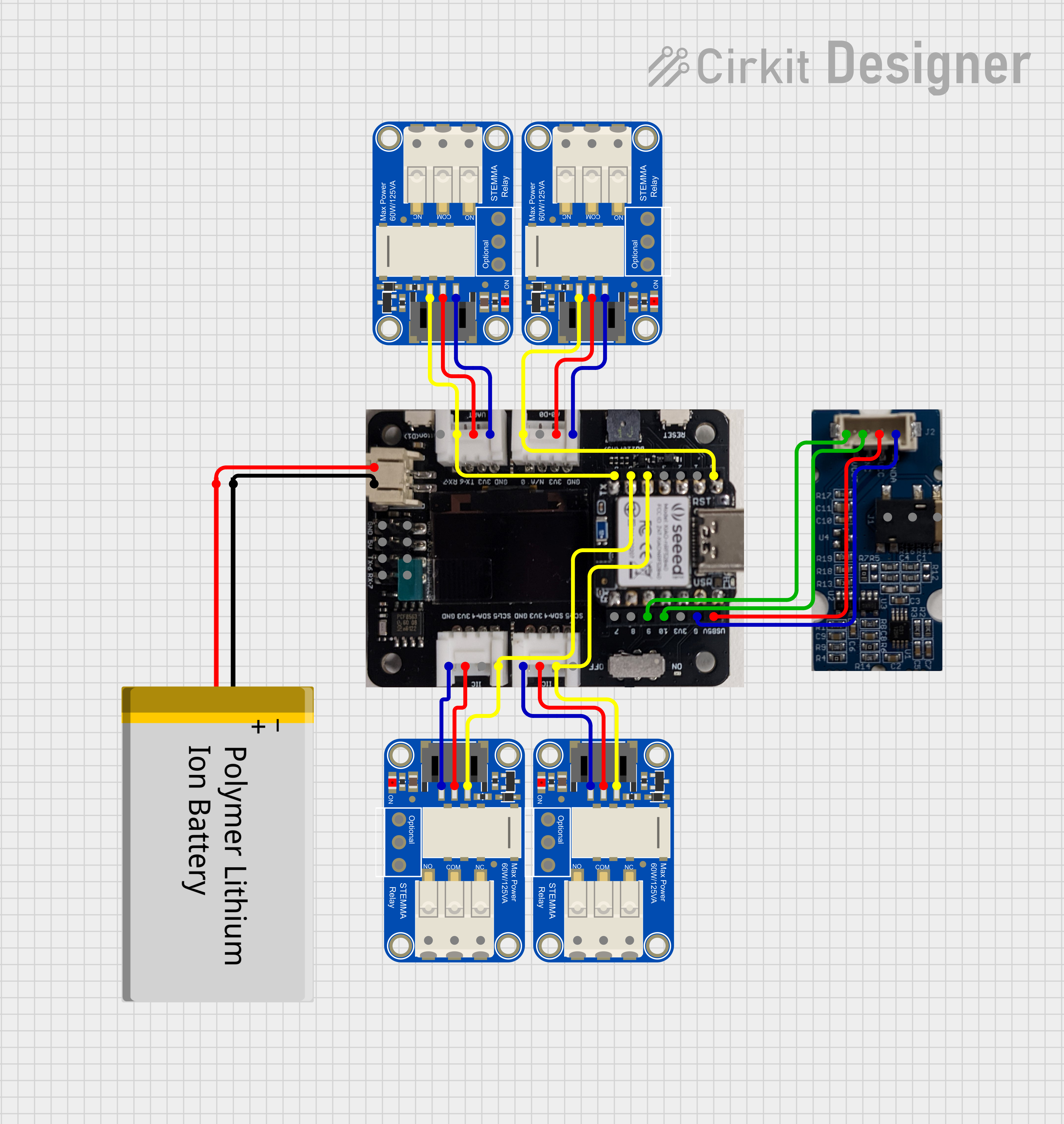
Before you begin, ensure you have the following:
- An EMS device compatible with the bioGen-EMS 2.0 toolkit.
- A microcontroller (e.g., Arduino) for interfacing between your computer and the EMS device.
- Python 3.x installed on your computer.
-
Clone the Repository:
git clone https://github.com/Integrated-Motor-Play/bioGen-EMS-2.0.git cd bioGen-EMS-2.0 -
Install the Required Python Libraries:
pip install -r requirements.txt
-
Upload the Firmware to Your Microcontroller:
- Navigate to the
firmware/directory and upload the provided code to your Arduino or compatible microcontroller using the Arduino IDE or a similar tool.
- Navigate to the
-
Connect the EMS Device:
- Connect your EMS device to the microcontroller as per the instructions in the
hardware/folder.
- Connect your EMS device to the microcontroller as per the instructions in the
Once the setup is complete, you can start using the bioGen-EMS 2.0 toolkit by running the provided Python scripts. These scripts allow you to control the EMS device, adjust stimulation parameters, and experiment with different configurations.
To run a basic EMS stimulation script, use the following command:
python ems_control.py --mode basic --intensity 50Refer to the examples/ directory for more complex use cases and detailed documentation.
To use bioGen-EMS 2.0 effectively, you will need the following hardware:
- EMS Device: A compatible EMS device that can be controlled via a microcontroller.
- Microcontroller: Arduino or equivalent, with sufficient GPIO pins to interface with the EMS device.
- Cables and Electrodes: Appropriate cables and electrodes for muscle stimulation.
Detailed hardware setup instructions are available in the hardware/ directory.
We welcome contributions to the bioGen-EMS 2.0 project! Whether you’re fixing bugs, adding new features, or improving documentation, your input is valuable.
- Fork the Repository.
- Create a New Branch:
git checkout -b feature-branch-name
- Make Your Changes and Commit Them:
git commit -m "Description of changes" - Push to Your Fork and Submit a Pull Request:
git push origin feature-branch-name
This project is licensed under the MIT License. See the LICENSE file for details.
Please contact the project maintainers at [hello@rakeshpatibanda.com] for questions, suggestions, or support.
Feel free to modify this README to better fit your project's specifics.