


-0078D6?logo=windows)
-0078D6?logo=windows)


A Modern Music Control Panel for Streamers
Manage song requests, queues, and streaming overlays in real-time with ease and professionalism.
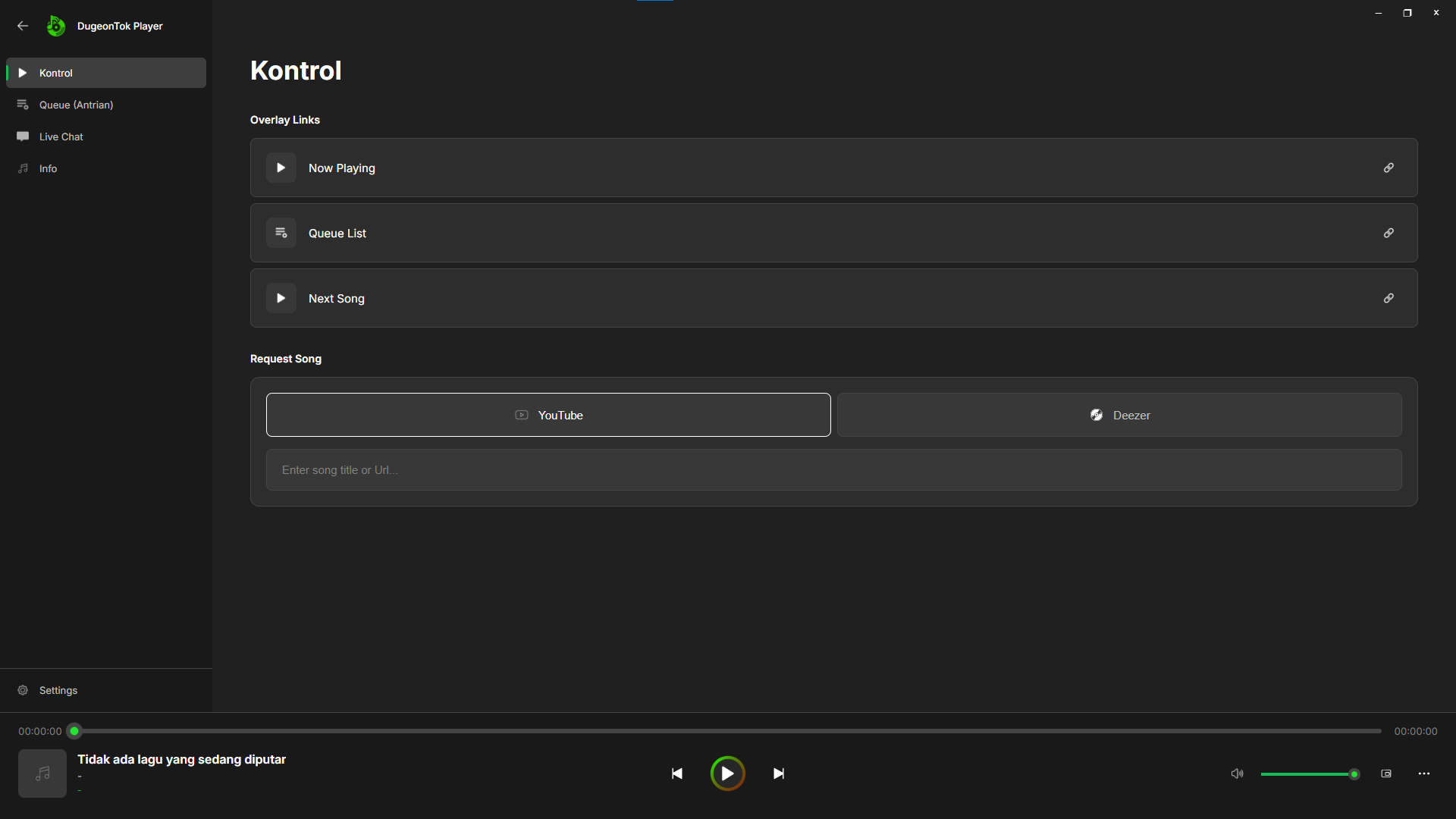
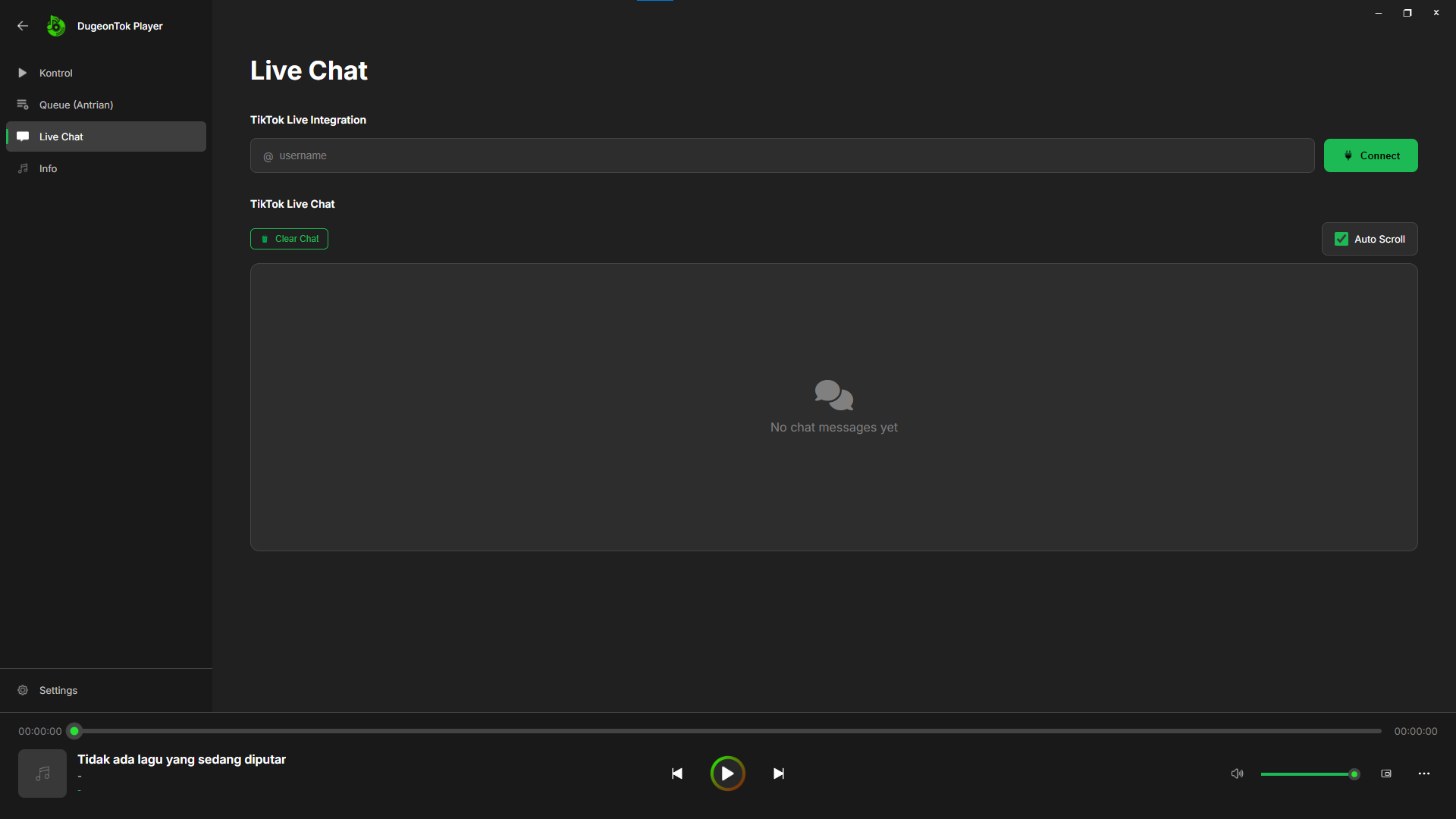
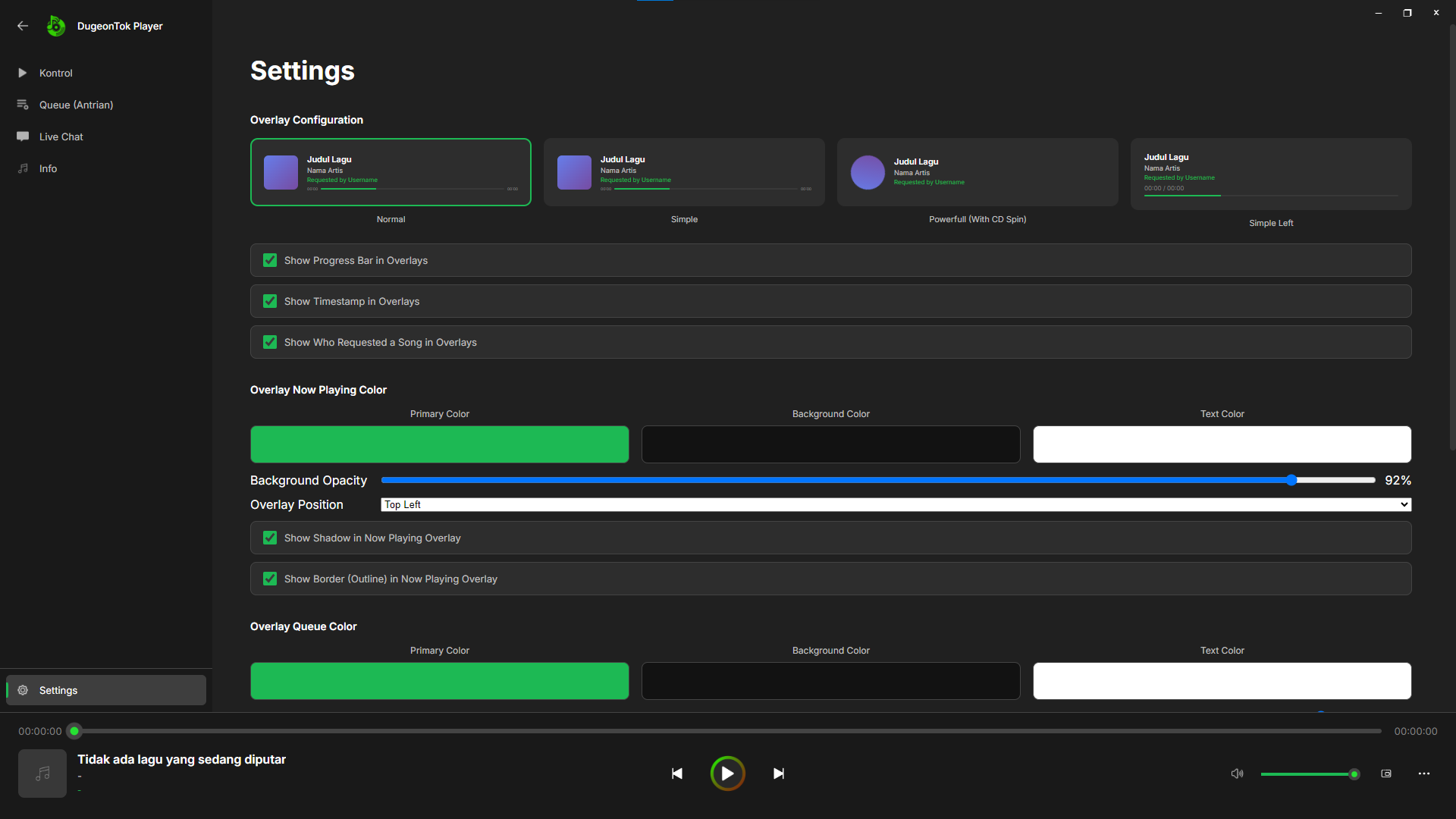
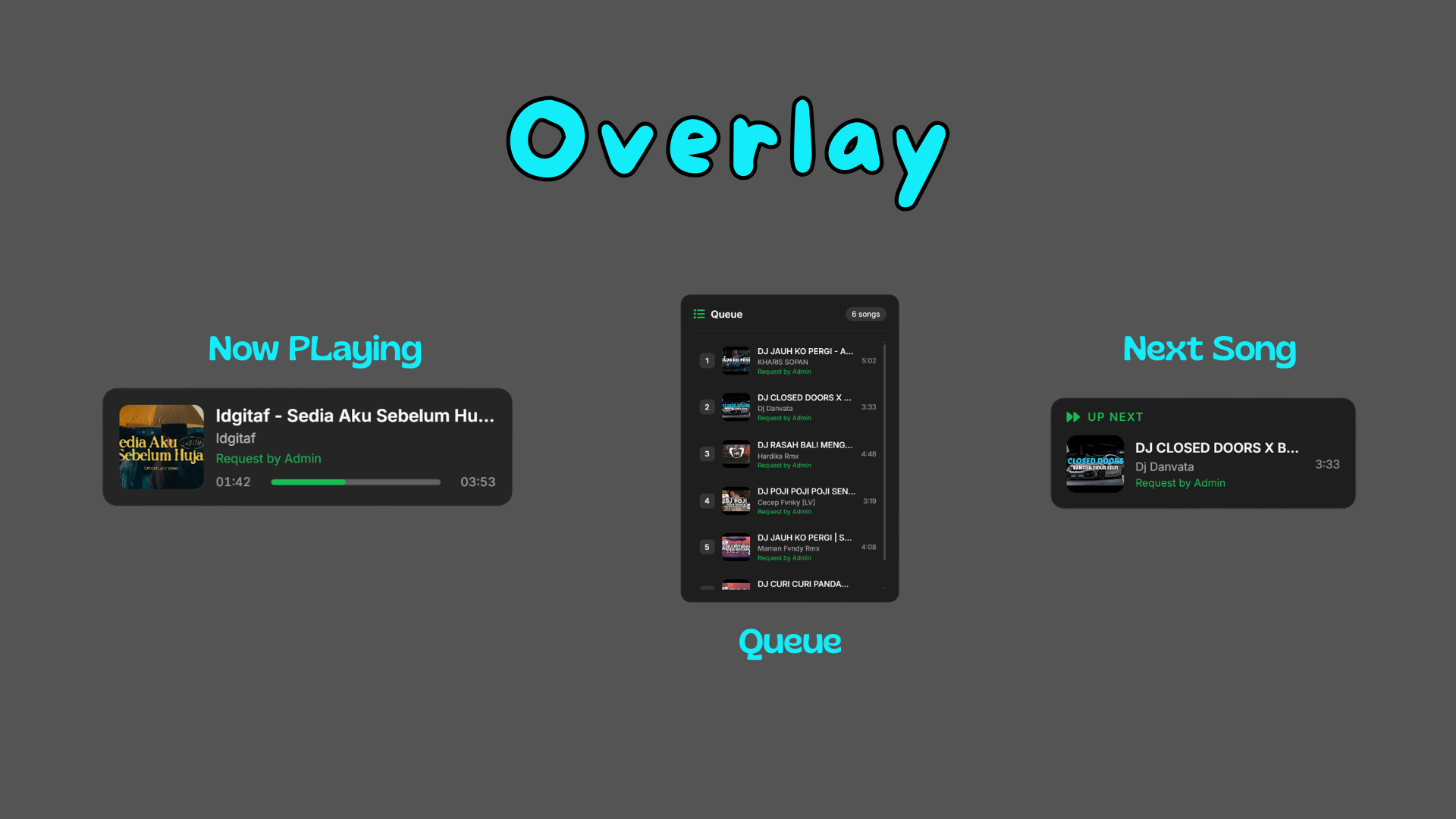
DugeonTok Player is a modern control panel designed specifically to help streamers manage music playback, receive song requests from viewers, and display streaming overlays in real-time.
This application was developed to provide a more organized, responsive, and professional streaming experience by integrating all music control needs into one efficient system.
With DugeonTok Player, users no longer need to switch between multiple applications to manage music during live streams. Everything from song requests, queue management, playback control, to overlay synchronization can be handled in one unified panel.
In addition, the application also supports integration with TikTok Live Chat, allowing viewers to interact directly by sending song requests that are automatically processed by the system.
DugeonTok Player was developed with the following main goals:
- Provide a centralized music control system for live streaming needs
- Improve real-time interaction between streamers and viewers
- Maintain consistent overlay visuals for a professional appearance
- Reduce workflow complexity during live broadcasts
- Improve viewer experience and engagement
- Supports song requests from:
- YouTube
- Deezer
- Spotify
- Automatic link processing and song search
- Direct integration into the queue system
- Dynamic and real-time queue system
- Flexible song ordering
- Skip, priority, and auto-play features
- Uses a Browser Source-based system
- Automatically syncs with the currently playing song
- Fully customizable overlay appearance
- Detects song requests directly from chat
- Keyword-based command system
- Automatically adds requests to the queue without manual intervention
- Play / Pause / Skip
- Real-time song status monitoring
- Direct control without interrupting the stream
- Compatible with:
- Virtual Audio Cable
- External sound card
- Multi-output audio system
DugeonTok Player is designed with a modular approach to ensure stability and flexibility:
-
Control Panel (Frontend)
Main user interface for interaction -
Playback Engine (Backend / Local)
Responsible for audio processing and playback -
Overlay Renderer
Displays song information visually in OBS, Streamlabs, TikTok LIVE Studio, etc -
Chat Integration Module
Manages input from live chat (TikTok)
This architecture allows the application to run stably, scalably, and be easier to develop further in the future.
DugeonTok Player is available in 50 languages, ensuring accessibility for streamers and audiences worldwide.
View Supported Languages (50)
| Language | Language | Language |
|---|---|---|
| 🇺🇸 English | 🇮🇩 Indonesian | 🇸🇦 Arabic |
| 🇨🇳 Chinese (Simplified) | 🇹🇼 Chinese (Traditional) | 🇯🇵 Japanese |
| 🇰🇷 Korean | 🇮🇳 Hindi | 🇮🇳 Marathi |
| 🇮🇳 Tamil | 🇮🇳 Telugu | 🇮🇳 Punjabi |
| 🇧🇩 Bengali | 🇵🇰 Urdu | 🇻🇳 Vietnamese |
| 🇹🇭 Thai | 🇰🇭 Khmer | 🇱🇦 Lao |
| 🇲🇲 Burmese | 🇲🇾 Malay | 🇵🇭 Filipino |
| 🇫🇷 French | 🇩🇪 German | 🇮🇹 Italian |
| 🇪🇸 Spanish | 🇵🇹 Portuguese | 🇳🇱 Dutch |
| 🇷🇺 Russian | 🇵🇱 Polish | 🇺🇦 Ukrainian |
| 🇨🇿 Czech | 🇭🇺 Hungarian | 🇷🇴 Romanian |
| 🇧🇬 Bulgarian | 🇭🇷 Croatian | 🇷🇸 Serbian |
| 🇸🇰 Slovak | 🇸🇮 Slovenian | 🇱🇻 Latvian |
| 🇱🇹 Lithuanian | 🇪🇪 Estonian | 🇫🇮 Finnish |
| 🇸🇪 Swedish | 🇳🇴 Norwegian | 🇩🇰 Danish |
| 🇬🇷 Greek | 🇹🇷 Turkish | 🇮🇷 Persian |
| 🇦🇱 Albanian | 🇮🇸 Icelandic |
- Operating System: Windows 10/11
- Architecture: x86 (32-bit) or x64 (64-bit)
- Streaming Software: OBS Studio, Streamlabs, TikTok Live Studio, or similar
- Network: Stable internet connection
-
Download & Run
Download the appropriate installer for your system architecture (x86 or x64) and launch DugeonTok Player. -
Configure Audio
Select the appropriate output audio device in settings. -
Setup Overlay in OBS
- Copy the overlay URL from the application
- Add it as a Browser Source in your streaming software
- Adjust dimensions and positioning as needed
-
Enable Chat Integration
- Connect your TikTok Live account
- Configure command keywords (optional)
-
Start Streaming
- Begin music playback
- Monitor requests and queue in real-time
The overlay can be fully customized to fit your needs:
- Text color and font
- Background and transparency
- Shadow and border
- Position and size
- Animations (if available)
This allows streamers to match the overlay with their brand and visual identity.
For the best results:
- Use the appropriate output device
- Use Virtual Audio Cable if needed
- Test before going live
- Make sure OBS is capturing the correct audio source
By using this application, users agree that:
- Usage must comply with streaming platform policies
- Music content comes from third-party services
- Users are responsible for the content used during live streams
- Features may change according to external service policies
We are committed to protecting user privacy:
- We do not collect sensitive data without permission
- Data is used only for application purposes
- Users are advised not to share personal data in public chats
- Data is limited to configuration, queue, and overlay information
This project is licensed under the Al Farrizi License © 2026.
See the LICENSE file for details.
At this time, the project is not open to public contributions.
For partnerships or collaboration, please contact the developer directly.
Future development will include:
- Improved YouTube integration stability
- More advanced overlay animations
- Request moderation system
- Multi-platform chat support
- Web-based control panel version
This software is provided "as is" without any warranties.
The developer is not responsible for damage, data loss, or service disruptions.
If this project helps you:
- ⭐ Give the repository a star
- 📢 Share it with fellow streamers
- 💬 Provide feedback for future development
DugeonTok Player was developed to simplify the streaming workflow while improving the production quality of live broadcasts.
Development will continue to ensure the application remains stable, relevant, and provides the best possible experience for users.