A high-throughput HTTP load testing project using the rnet library (Rust-based HTTP client with updated TLS settings to bypass WAF checks). This project demonstrates achieving over 20,000 requests per second (RPS) with proper system tuning and client configuration.
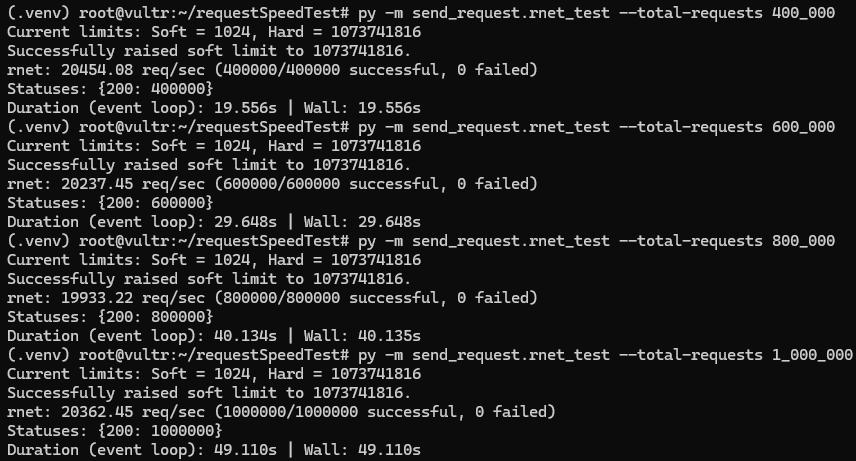
I was able to send 10 million requests in 8 minutes:

This project explores the limits of HTTP load testing with rnet, focusing on:
- Overcoming client-side bottlenecks (file limits, ephemeral ports, connection reuse)
- Server-side tuning for high concurrency (Nginx, kernel parameters)
- Performance scaling across different server configurations
- Error analysis and optimization
rnetdoes not increase open file limits on Linux, causing failures with bursty requests- Requires manual tuning for high concurrency
- Initial Results: ~1k RPS on local machine with default settings
- After Tuning: 9k RPS on 4vCPU/8GB server
- Peak Performance: 20k RPS on 32vCPU dedicated server
- Stability: Maintains performance up to 10M+ requests
- 2vCPU/4GB (shared): ~5k RPS
- 4vCPU/8GB (shared): 9k RPS
- 8vCPU (shared): 15k RPS
- 32vCPU (dedicated): 20k RPS
- File Descriptor Limits: "Too many open files" → Increase
ulimitand sysctlfs.file-max - Ephemeral Port Exhaustion: "Cannot assign requested address" → Expand
net.ipv4.ip_local_port_range - HTTP/2 GOAWAY: Server closing connections → Increase
worker_connectionsandhttp2_max_concurrent_streams - TLS Errors: Invalid certificate context → Disable verification for testing
-
Client-Side:
- Increased file descriptors to 65k
- Expanded ephemeral ports to 64k range
- Enabled TCP TIME_WAIT reuse
- Adjusted client count for optimal multiplexing (1 client per 100 workers)
-
Server-Side:
- Nginx
worker_connectionsset to 65k - HTTP/2 streams increased to 1k per connection
- Kernel
somaxconnset to 65k - Systemd limits configured
- Nginx
- Linux server (Ubuntu 25.04 recommended)
- Python 3.13+
- Root access for system tuning
-
Clone and Install:
git clone https://github.com/lafftar/requestSpeedTest.git
cd requestSpeedTest
python3 -m venv .venv
source .venv/bin/activate
pip install -r requirements.txt
pip install uvloop
-
Tune Client System:
sudo bash client/tune_server.sh sudo reboot # Required for limits to take effect -
Setup Server (if running on same machine):
sudo bash server/startup_script.sh
source .venv/bin/activate
python -m send_request.rnet_test --total-requests 100000 --concurrency 10000- 400k requests: 15k RPS
- 1M requests: 8k RPS (stable)
- 10M requests: Consistent performance
send_request/rnet_test.py: Main load testing scriptclient/: Client-side setup and tuning scriptsserver/: Server-side Nginx configuration and tuningutils/: Shared utilities (logging, limits)notes.md: Detailed findings and test results with screenshots
- If scripts fail, follow manual instructions in
client/README.mdandserver/README.md - Ensure
ulimit -nshows 65536 after reboot - Check server logs for Nginx errors
- For high concurrency, monitor CPU and memory usage
This project is focused on performance analysis. Contributions for further optimizations or additional HTTP clients welcome.
MIT License