pcm-sensor-server is a collector exposing Intel processor metrics over http in JSON or Prometheus (exporter text based) format. Also available as a docker container.
NEW: pcm-sensor-server is now supported on Windows! See Windows-specific instructions below.
Installation on target system to be analyzed:
- Build or download pcm tools
- As root, start pcm-sensor-server:
sudo ./pcm-sensor-serveror as non-root https://github.com/intel/pcm#executing-pcm-tools-under-non-root-user-on-linux
Alternatively one can start pcm-sensor-server as a container from docker hub.
Additional options:
$ ./pcm-sensor-server --help
Usage: ./pcm-sensor-server [OPTION]

Valid Options:
    -d                   : Run in the background (Linux/macOS only)
    -p portnumber        : Run on port <portnumber> (default port is 9738)
    -l|--listen address  : Listen on IP address <address> (default: all interfaces)
    -r|--reset           : Reset programming of the performance counters.
    -D|--debug level     : level = 0: no debug info, > 0 increase verbosity.
    -R|--real-time       : If possible the daemon will run with real time
                           priority, could be useful under heavy load to
                           stabilize the async counter fetching. (Linux only)
    -h|--help            : This information
The -l/--listen option allows you to specify which IP address the server should bind to. This is useful in multi-homed servers, containerized deployments, or restricted monitoring networks:
# Bind to localhost only (accessible only from the local machine)
sudo ./pcm-sensor-server -l 127.0.0.1 -p 9738

# Bind to a specific management network interface
sudo ./pcm-sensor-server -l 192.168.1.10

# Bind to all interfaces (default behavior)
sudo ./pcm-sensor-serverpcm-sensor-server now runs natively on Windows. Key points:
- Requirements: Windows 10+ or Windows Server 2016+ (earlier versions may work but are no longer officially supported), Administrator privileges, MSR driver installed
- Build instructions: See WINDOWS_HOWTO.md
- Limitations:
- Daemon mode (
-d) not available - runs in foreground only - Real-time priority (
-R) not available - Use Ctrl+C to stop the server
- Daemon mode (
Example on Windows:
# Run as Administrator
pcm-sensor-server.exe -p 9738
The default output of pcm-sensor-server endpoint in a browser:

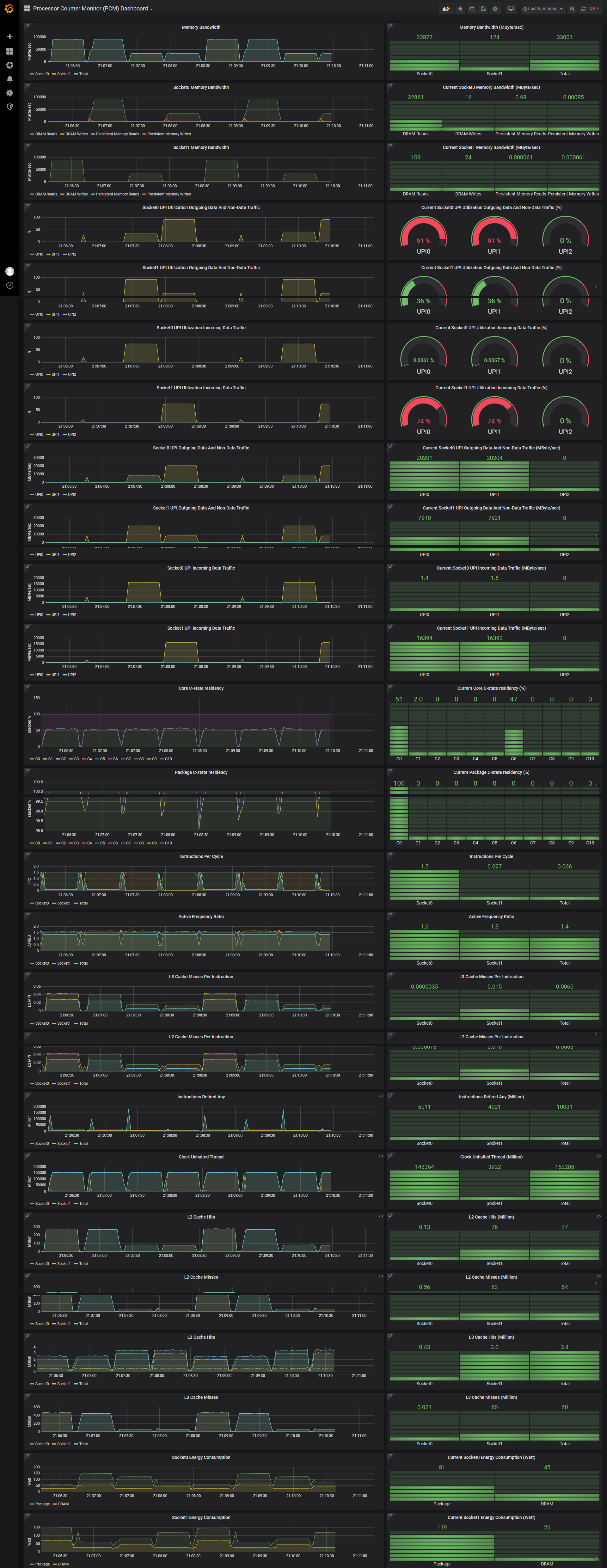
The PCM exporter can be used together with Grafana to obtain these Intel processor metrics (see how-to):